Back Import Your List From Excel
Import addresses right from your hard drive
   
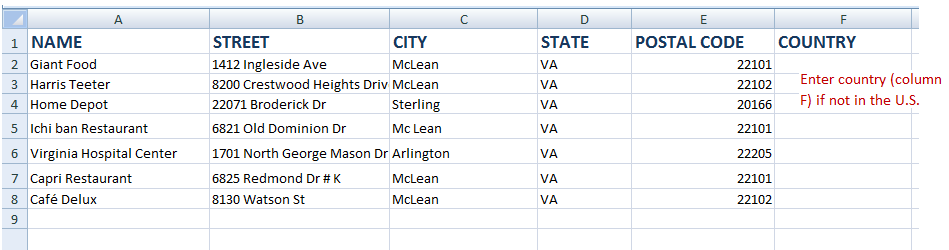
  Please specify a file name to upload. 5 seperate columns are needed (add another column F for country if not in the U.S).  The file format must be Excel, CSV (comma delimited) or DBF (dBaseIII+). The name field must be unique and a valid address is required before a location can be added.  The columns must be in the following order:
More options...
  • Name - a unique name to distinguish each record (column A)
  • Street (column B)
  • City (column C)
  • State (column D)
  • Zip (column E)
  • Country -- optional column Needed if not U.S. (column F)
OR
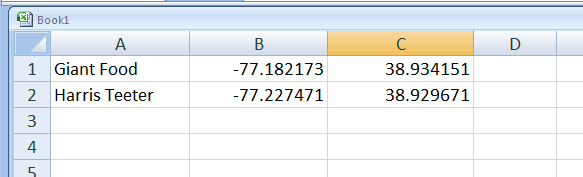
  • Name
  • Longitude (decimal)
  • Latitude (decimal)
Issues importing?
Please be sure your file does not contain any other information other than the above columns. No headers or column titles are allowed.
Click 'Browse' to select your file, then click 'Upload' to import your list.
   
email us
Select file to upload 
 
Questions? 
1-800-876-2060